

Data Retention Settings
CredSpark allows account administrators to configure how long interaction responses are stored. This helps organizations manage data responsibly and meet internal, regulatory, or legal data retention requirements.
Data retention settings apply organization-wide and affect all interaction responses within the account.
Accessing Data Retention Settings
To configure your organization’s data retention policy:
- Open the Admin Settings
- Navigate to Data & Compliance
- Select Data Retention Policy
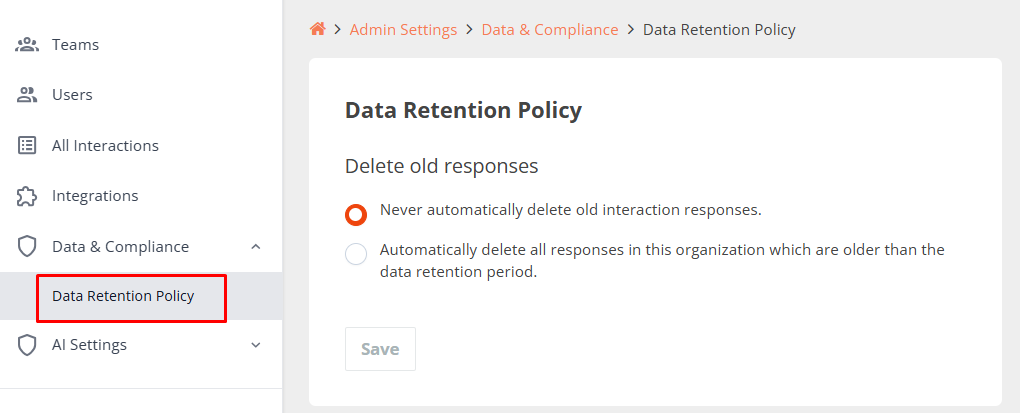
Delete Old Responses
By default, CredSpark does not automatically delete interaction responses. Administrators can choose between the following options:
- Never automatically delete old interaction responses (default)
Responses are retained indefinitely unless deleted manually.
- Automatically delete all responses older than a specified retention period
Responses are permanently removed once they exceed the configured retention window.
If you choose to automatically delete old responses, CredSpark will enforce an organization-wide data retention period for all interaction responses.
Here’s what happens:
- You define how long responses should be retained by setting a Data Retention Period (for example, 5 years).
- Responses remain available only for this period.
- Responses older than the selected retention period are automatically deleted during an overnight process, so you may not see the deletion reflected immediately after saving the setting.
- Once responses are deleted, they cannot be restored.
- This setting applies to all past and future responses across the organization.
- When this setting is enabled or updated, all administrators within the account receive an automated notification informing them of the change.
- For security and auditing purposes, CredSpark records logs of who made data retention changes, when they were made, and what was updated. If you need access to this information, please contact our support team.