

Open-ended questions can generate some of the most valuable feedback, but reviewing and synthesizing dozens (or hundreds) of responses manually takes time.
AI Response Summary helps you quickly understand user feedback by automatically analyzing responses and surfacing key themes, sentiment, and representative quotes.
AI Response Summary is available under:
Data & Analytics → AI Response Summary
It allows you to generate an AI-powered summary for any Short Answer or Long Answer (open-ended) question with at least 10 responses.
Once generated, CredSpark will return:
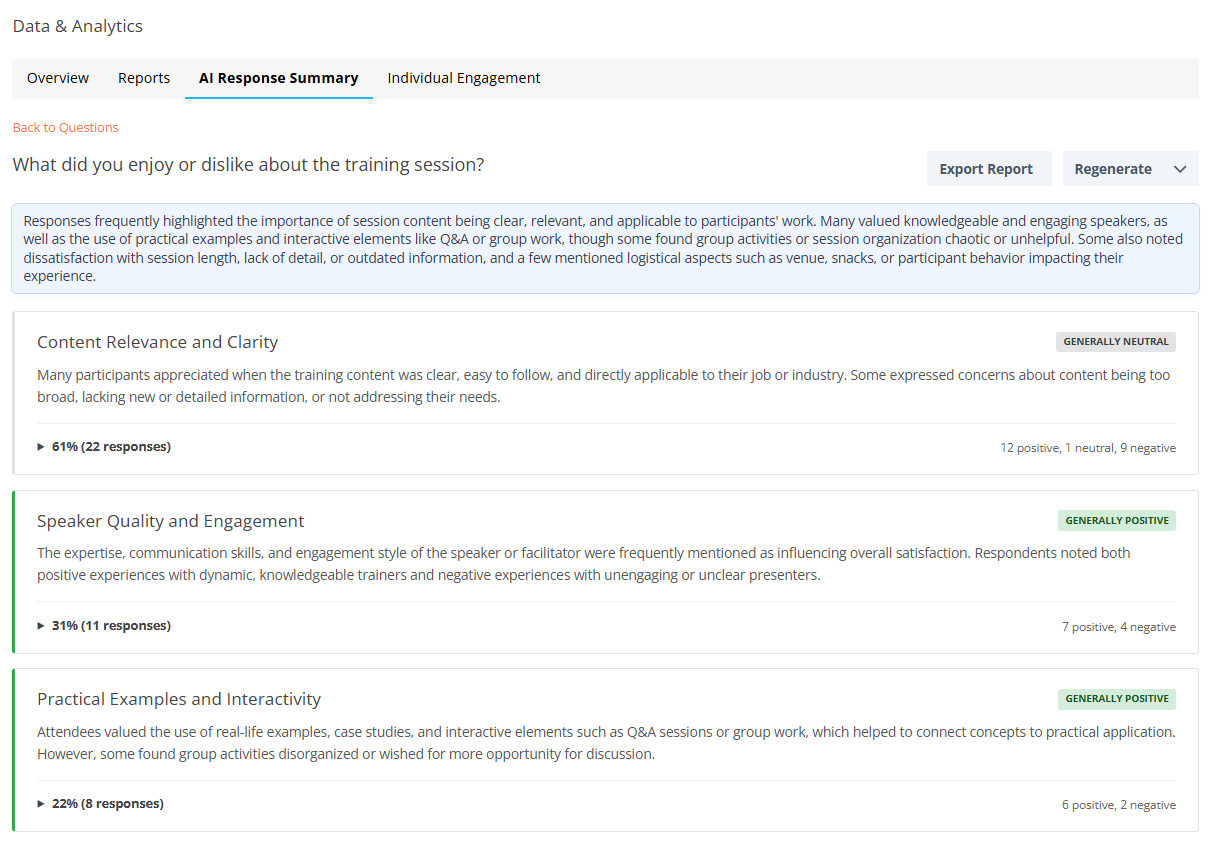
- A short overall summary of the responses
- Key themes and what they represent
- (Optional) sentiment analysis per theme
- Example quotes pulled directly from responses
- A section for responses that were not included in analysis
This feature is designed to help you extract insights faster and scale qualitative analysis across high-volume datasets.
When should I use this?
AI Response Summary is especially helpful when you want to:
- Quickly identify patterns in qualitative feedback
- Understand common needs, challenges, or preferences
- Reduce time spent manually reviewing responses
- Turn open-ended feedback into actionable insights
How to generate an AI Response Summary
1. Go to Data & Analytics
2. Open the AI Summary tab
3. Select an open-text question (must have 10+ responses)
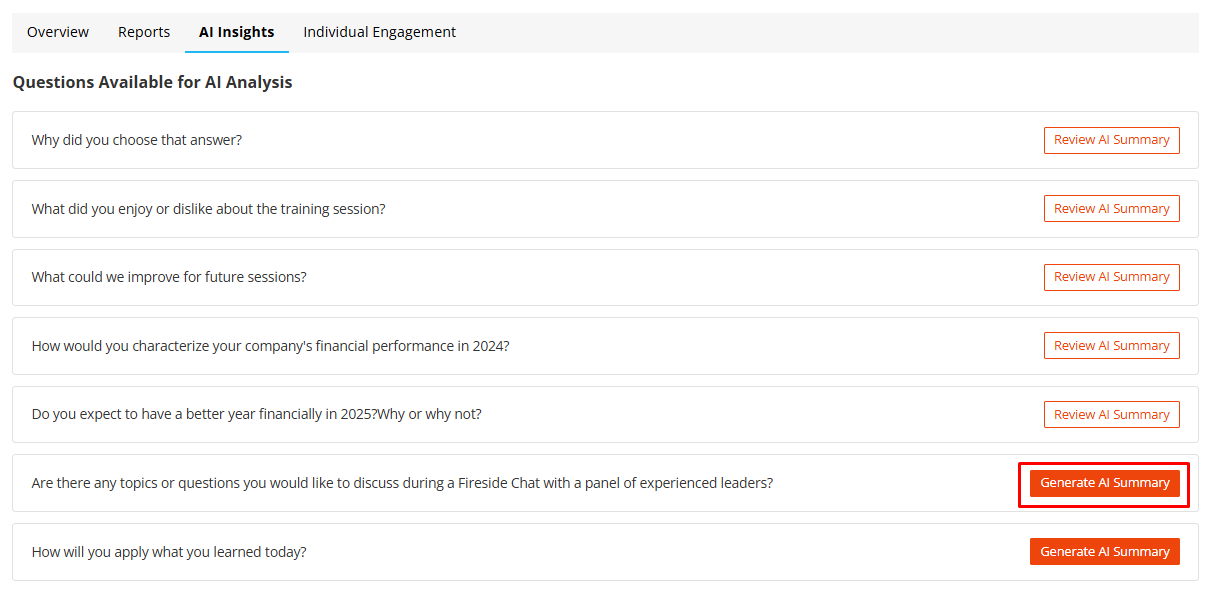
4. Click Generate AI Summary
5. Choose whether to include Sentiment Analysis
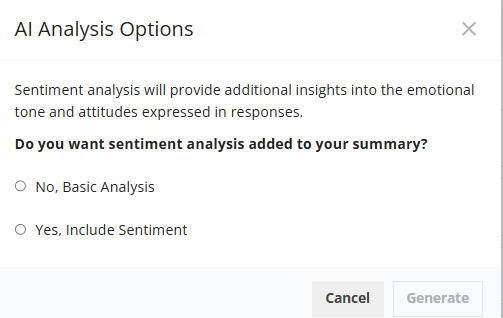
6. Confirm to generate the summary
Once complete, your results will appear directly in the AI Summary tab.
When should I use sentiment analysis?
Sentiment analysis is optional and should be used when understanding emotional tone adds meaningful context to the feedback you’re analyzing.
It is most helpful when you want to:
- Gauge overall positive, neutral, or negative reactions to an experience, product, or change
- Understand how people feel, not just what they mention
- Identify areas of friction, dissatisfaction, or strong approval
- Track sentiment trends over time for recurring questions
Use cases for sentiment analysis
Sentiment analysis works best for questions that:
- Ask for opinions, reactions, or satisfaction (for example: “What can we do better?”)
- Collect feedback on launches, events, content, or programs
- Surface emotional responses such as frustration, excitement, or concern
When sentiment analysis may not be useful
You may want to skip sentiment analysis when:
- Responses are primarily factual or descriptive
- The question is focused on ideas, suggestions, or explanations, rather than feelings
- Emotional tone is not relevant to the decision you’re trying to make
In these cases, themes and representative quotes often provide clearer and more actionable insights on their own.
Tip
If you are unsure whether sentiment analysis will add value, start by generating the summary without sentiment analysis. You can always regenerate the summary later with sentiment included.
What’s included in the AI Response Summary?
1) General Summary
A short 2-3 sentence overview describing the overall tone and main takeaways across responses.
2) Key Themes (up to 5)
CredSpark will return up to five key themes, each including:
- Theme title (short label)
- Theme description (1-2 sentences)
- Representative quotes (2-3 examples)
Important: A single response may be associated with more than one theme if it meaningfully touches on multiple topics. This allows the summary to better reflect nuanced feedback rather than forcing each response into a single category.
3) Sentiment Breakdown (optional)
If sentiment analysis is enabled, each theme will include a sentiment breakdown such as:
- 7 Positive
- 4 Negative
- 2 Neutral
Sentiment categories include:
- Generally Positive (green)
- Generally Neutral (gray)
- Generally Negative (orange)
4) Not Included in Analysis
Some responses may not fit into a meaningful theme (for example: irrelevant answers, incomplete text, or uncategorizable content).
These responses will appear under Not Included in Analysis so you can still review them if needed.
Regenerating an AI Response Summary
After a summary has been generated, you can update it in two ways:
Apply Topics to New Responses (default)
This option updates the existing summary by applying the current themes to new responses only.
Use this when:
- You are collecting responses over time
- You want your summary to stay up to date without reprocessing everything
Regenerate Full Summary
This option recreates the entire summary from scratch, using all responses.
Use this when:
- Your dataset has changed significantly
- You want the AI to reassess themes based on the full set of responses
Exporting AI Response Summary results
You can export AI Response Summary results in two formats:
PDF Export
- Includes a shareable overview of:
- Themes and descriptions
- Response counts
- Sentiment breakdowns (if enabled)
- Representative quotes
Best for sharing insights with stakeholders.
CSV Export
Includes a full dataset export containing:
- Response text
- Assigned theme
- Sentiment tag (if enabled)
Best for deeper analysis, filtering, and reporting outside of CredSpark.
Access & Configuration
AI Response Summary is available for eligible license tiers. Once the feature is enabled for your organization, Admins can control how it is used and which AI models are applied.
Configuration is managed under:
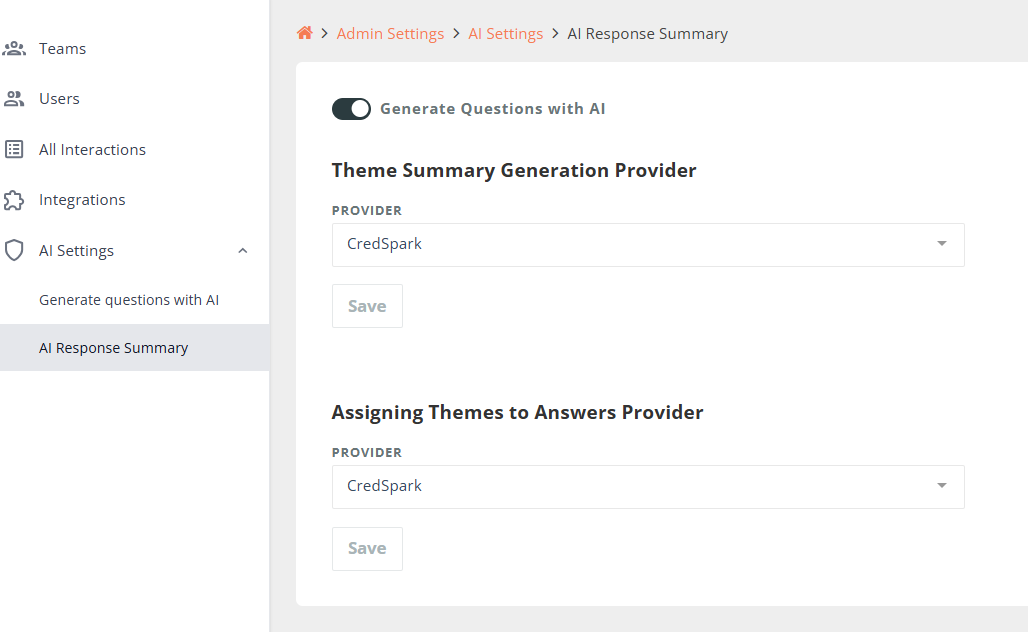
Admin Settings → AI Settings → AI Response Summary
Model Selection for AI Response Summary
Admins can select AI providers separately for different tasks within AI Response Summary:
1. Theme Summary Generation Provider
This model is used to:
- Generate the overall summary
- Identify and describe key themes
2. Assigning Themes to Answers Provider
This model is used to:
- Assign themes to individual responses
- Perform sentiment analysis (if enabled)
These providers can be configured independently, giving organizations the flexibility to choose different models based on accuracy, cost, performance, or compliance requirements.
Recommendation
If you are unsure which models to select, we recommend starting with the CredSpark default provider for both tasks. The CredSpark default provider uses an OpenAI model selected and managed by CredSpark to balance quality, performance, and cost.
Once you are comfortable with the feature, you can:
- Experiment with different models for specific tasks
- Use one model for high-level summarization and another for detailed response-level analysis
- Adjust configurations over time as your needs evolve
Changes take effect for newly generated summaries and do not retroactively update existing results.
Data handling and privacy notes
To generate AI Response Summaries, CredSpark uses a third-party AI provider (OpenAI) to process response data.
Only the question text and the text of responses to open-ended questions selected for summarization is shared for processing. CredSpark does not send:
- Respondent names
- Email addresses
- Identifiers or account-level metadata
- Any other sensitive fields where applicable
CredSpark intentionally limits the data sent to AI providers to the minimum required to perform the requested analysis.
AI processing is used solely to:
- Generate high-level summaries
- Identify themes
- Assign optional sentiment
Response data is processed in accordance with CredSpark’s data handling and security practices and is not used by AI providers to train their models.
Important notes about AI-generated results
AI Response Summary is an experimental AI-powered feature. While it is designed to help surface insights more quickly, AI-generated results should be treated as assistance, not as a replacement for human review.
AI works best at identifying broad patterns across large sets of responses, but it may not always fully understand context, nuance, or domain-specific meaning.
Here are a few examples of where this can happen:
- Context matters:
For a question like “What could we improve?”, a response such as “the speaker” may be summarized as neutral or even positive, when in reality the participant was expressing dissatisfaction.
- Short answers can be misleading:
A response like “fine” or “okay” may be interpreted as positive sentiment, even though it might reflect indifference or mild frustration.
- Tone isn’t always obvious:
Feedback that appears neutral on its own may actually be praise or criticism when read alongside other responses or with knowledge of the event or audience.
Because of this, we recommend reviewing individual responses alongside the AI summary, especially for high-stakes decisions or questions focused on improvements, feedback, or sentiment.
For best results, we recommend:
- Reviewing summaries alongside representative quotes
- Spot-checking responses, especially for high-stakes decisions
- Using AI insights as a starting point for analysis, not the final source of truth